Software vendor audits are not random. Vendors know when your deployed user count exceeds your contracted entitlements. They track it. Most enterprise SaaS contracts include audit rights clauses that give vendors the ability to inspect your usage records on 30 days notice. And 48% of organisations were audited by at least one software vendor in the last 12 months.
The question for a mid-size company is not whether audit exposure exists in the portfolio. It almost certainly does. The question is whether you find the gaps first, or your vendor does.
What Is Software Audit Exposure?
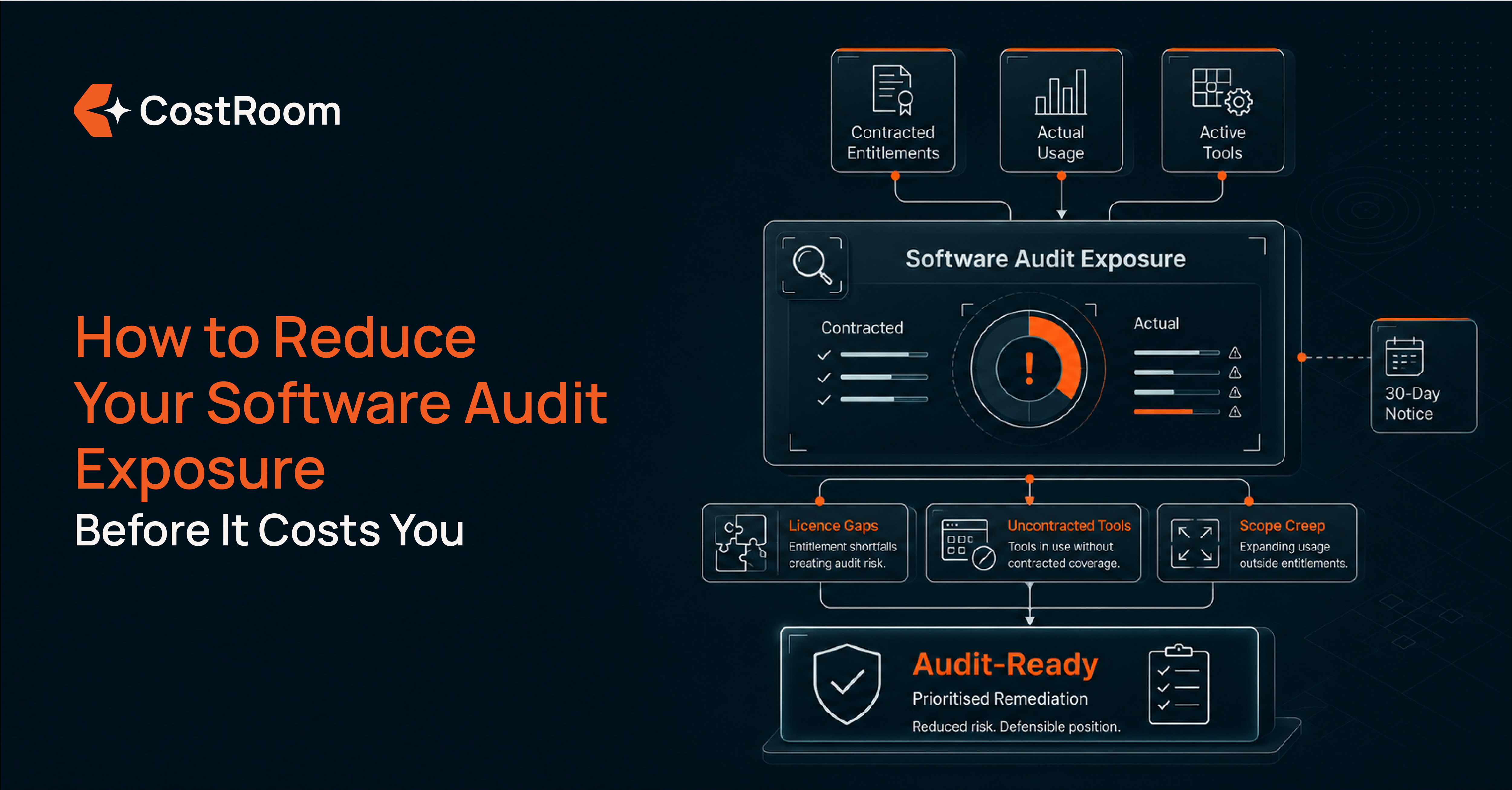
Software audit exposure is the financial and legal risk a company carries when its actual usage of a vendor's software is not fully documented, contracted, or reconciled against the terms of the agreement. When a vendor exercises its audit rights, any gap between contracted entitlements and actual usage becomes a liability. The exposure is proportional to the gap, but the cost of addressing it, including legal fees, IT time, and negotiation, typically exceeds the licence gap itself.
Most mid-size companies carry software audit exposure without knowing its scale. The gaps accumulate gradually: a team adds users to a platform without updating the contract, a tool that started as a trial continues operating after the trial period, an employee leaves without their account being deprovisioned. None of these changes trigger an internal alert. The vendor's records update automatically. The company's records do not.
For the broader vendor risk picture that audit exposure sits within, see SaaS and Cloud Vendor Risk Management: The Complete Guide for Mid-Size Companies.
What Triggers a Software Vendor Audit
Understanding what triggers audits is the first step toward reducing the probability of one.
Large SaaS and software vendors track deployment data continuously. When their telemetry detects that a customer's deployed user count materially exceeds the contracted entitlement, the account is flagged for audit review. This is not a manual process at most large vendors: it runs on a regular automated cycle.
Beyond telemetry-triggered audits, three other situations increase audit risk significantly. A non-renewal decision: vendors audit departing customers at a higher rate than renewing ones, because the audit is the last opportunity to recover unlicensed usage before the relationship ends. M&A activity: a company that has been acquired or has acquired another business often inherits licence entitlements that do not match the combined entity's actual usage, and vendors regularly audit in the 12 months following a transaction. And the routine exercise of audit rights: most enterprise SaaS contracts include clauses allowing the vendor to audit at any time on standard notice, and vendors with active compliance programmes exercise these rights as a matter of course.
Mid-size companies are specifically exposed because they typically lack the dedicated software asset management function that large enterprises use to track entitlements continuously.
Where Audit Exposure Comes From in a Mid-Size Portfolio
Three sources account for the majority of audit exposure at mid-size companies.
Uncontracted tools. Tools that are active and generating cost but have no formal contract on record. These carry the highest audit risk because there is no agreed scope of use and no negotiated terms to reference if the vendor initiates an audit. For more on how uncontracted tools accumulate and where to find them, see Why Mid-Size Companies Have More Uncontracted SaaS Spend Than They Think.
Scope creep. Contracted usage that has expanded beyond what the original agreement covers. User count growth, usage in additional geographies, new integrations, and expanded deployment across departments all create scope gaps if the contract was never formally updated to reflect them. Vendors that provide usage dashboards to customers are often the same vendors using that data internally to identify audit candidates.
AI tools on expired trial terms. Tools that began as free or paid trials and continued to operate after the trial period, often without anyone in finance or IT realising the terms had changed. Post-trial usage that has not been formalised into a contract sits in a position that vendors can use to establish an unlicensed usage claim.
The data confirms this is a widespread problem: 44% of organisations report spending more than $1 million on software audits over the past three years.
What Software Audits Actually Cost
The true-up fee is the most visible audit cost, but it is rarely the largest.
A software audit at a mid-size company typically requires external legal support to review the audit scope, interpret contractual rights, and negotiate the settlement. It requires two to six weeks of IT and finance time gathering licence records, usage data, and contract documentation. And it requires a negotiation process that the vendor is better prepared for than the company, because the vendor has run this process dozens of times and the company typically has not.
The final settlement covers any licence gap at the vendor's standard list price, without the discounts the company would have received through a standard procurement or renewal process. Where the company cannot produce clean usage data, the vendor's records become the default. This is typically the most expensive outcome.
44% of organisations have spent more than $1 million on software audits over three years. That figure includes legal and internal labour costs alongside the settlement itself. For a mid-size company, a single major audit represents a material unplanned expense with no offsetting value. For how vendor risk assessment feeds into audit preparedness, see What Is a SaaS Vendor Risk Assessment and How Does It Work?
Find Your Licence Gaps Before Your Vendor Does
CostRoom maps every active SaaS, cloud, and AI tool, identifies where contracted usage has been exceeded, and surfaces uncontracted tools before an audit request arrives.
How to Reduce Your Audit Exposure Before It Happens
Audit exposure can be reduced through five specific actions, each of which closes a gap that vendors use to establish unlicensed usage claims.
Establish accurate licence counts. Map every contracted entitlement against actual deployed users across the full portfolio. The gap between what the contract says and what is actually deployed is the audit liability. Finding it first means addressing it on your terms, not the vendor's.
Reconcile contracted scope against current usage. For each vendor, identify where usage has grown beyond what the agreement covers: additional users, new geographies, expanded integrations, or usage by entities not named in the original contract. Each creates scope gap exposure that a vendor audit would surface.
Formalise uncontracted tools. Tools running without a contract carry the highest audit risk. For each one in the portfolio: formal contract with agreed usage scope, or discontinuation. There is no middle position that reduces exposure.
Deprovision departed-employee accounts. A significant proportion of licence over-deployment at mid-size companies comes from accounts that were never deactivated after employees left. These accounts continue counting against entitlements and contribute directly to audit exposure with no business value attached.
Build and maintain a renewal calendar. The renewal window is the only point in the contract lifecycle where the company can renegotiate scope and pricing before terms lock in automatically. Identifying scope gaps before renewal means they are addressed through negotiation rather than through a retroactive true-up at list price. For how to make this systematic, see SaaS and Cloud Contract Renewal Management: The Complete Guide for Mid-Size Companies.
What to Do When a Vendor Requests an Audit
When an audit request arrives, the most important step is not to respond immediately.
Most audit rights clauses give the company 30 days to arrange the audit, not to complete it. That window is the preparation period. Engage legal counsel before any communication with the vendor. Gather all licence, contract, and usage data before granting access to any system. Understand what the contract actually requires in terms of audit scope and what records the vendor is entitled to inspect.
The company that arrives at an audit with a clean, current vendor register and accurate deployment data negotiates from a fundamentally different position than one that does not. Where records are clean and complete, discrepancies can be challenged. Where records are absent or incomplete, the vendor's data becomes the default, and the settlement reflects it.
Audit readiness is not a response to an audit request. It is a state that exists before any request arrives.
How a Spend Review Reduces Audit Exposure Structurally
A vendor-agnostic spend review finds the licence gaps before the vendor does.
It maps every active tool across SaaS, cloud, and AI, identifies contracts where usage has exceeded the agreed scope, surfaces uncontracted tools that carry the highest audit risk, and produces a prioritised remediation list. Running a spend review before annual renewals means scope gaps are closed on the company's terms, through negotiation, rather than through a vendor-initiated audit process where the vendor controls the timeline and the methodology.
CostRoom's Spend Analysis and Optimisation delivers this as a structured engagement: every active vendor mapped, licence counts reconciled against contracted entitlements, and a clear priority list of where to act before the next renewal cycle.
Get Audit-Ready Before the Vendor Calls
CostRoom identifies your licence gaps, uncontracted tools, and scope creep before they become an audit liability.
Frequently Asked Questions
What is software audit exposure?
Software audit exposure is the financial and legal risk a company carries when its actual usage of a vendor's software is not fully documented, contracted, or reconciled against the terms of the agreement. When a vendor exercises its audit rights, any gap between contracted entitlements and actual usage becomes a liability. The exposure includes not just the true-up fee for unlicensed usage but also the legal costs, internal time, and negotiation overhead involved in resolving the audit.
What triggers a software vendor audit?
Software vendor audits are most commonly triggered by usage telemetry showing deployed user counts exceeding contracted entitlements, a customer's decision not to renew a contract, M&A activity that creates licence entitlement mismatches, and the routine exercise of audit rights clauses that most enterprise SaaS contracts include. Mid-size companies are particularly exposed because they typically lack the dedicated software asset management function that large enterprises use to track entitlements continuously.
How much does a software audit cost a mid-size company?
44% of organisations report spending more than $1 million on software audits over the past three years. This figure includes the settlement for any licence gap, external legal fees, and the internal IT and finance time required to gather records and negotiate the outcome. Where the company cannot produce clean usage data, the vendor's records become the default basis for the settlement, which typically produces the highest cost outcome.
What is the best way to reduce software audit exposure?
The most effective approach combines five actions: establishing accurate licence counts across every vendor in the portfolio; reconciling contracted scope against current usage to find where growth has exceeded the agreement; formalising uncontracted tools that have no agreed usage scope; deprovisioning departed-employee accounts that contribute to licence over-deployment; and maintaining a renewal calendar that surfaces scope gaps before they lock in automatically. A structured spend review delivers all five outputs before any audit request arrives.