A 12-month renewal calendar sounds straightforward. For most mid-size companies, building the first version reveals that the current state is more complex than anyone anticipated: contracts with different notice periods, auto-renewal clauses that vary by vendor and product tier, cloud commitments running on separate cycles, and a significant share of tools that were never formally procured and have no documented renewal date anywhere in the system.
This guide covers exactly what goes into a 12-month SaaS and cloud renewal calendar: the data required, the process for setting engagement windows, and where manual management stops being adequate at scale. This is a practical guide for wherever the current state actually is, not a theoretical framework for the ideal state. For the broader context on what structured renewal management involves, see SaaS and Cloud Contract Renewal Management: The Complete Guide.
What a 12-Month Renewal Calendar Is: And What It Is Not
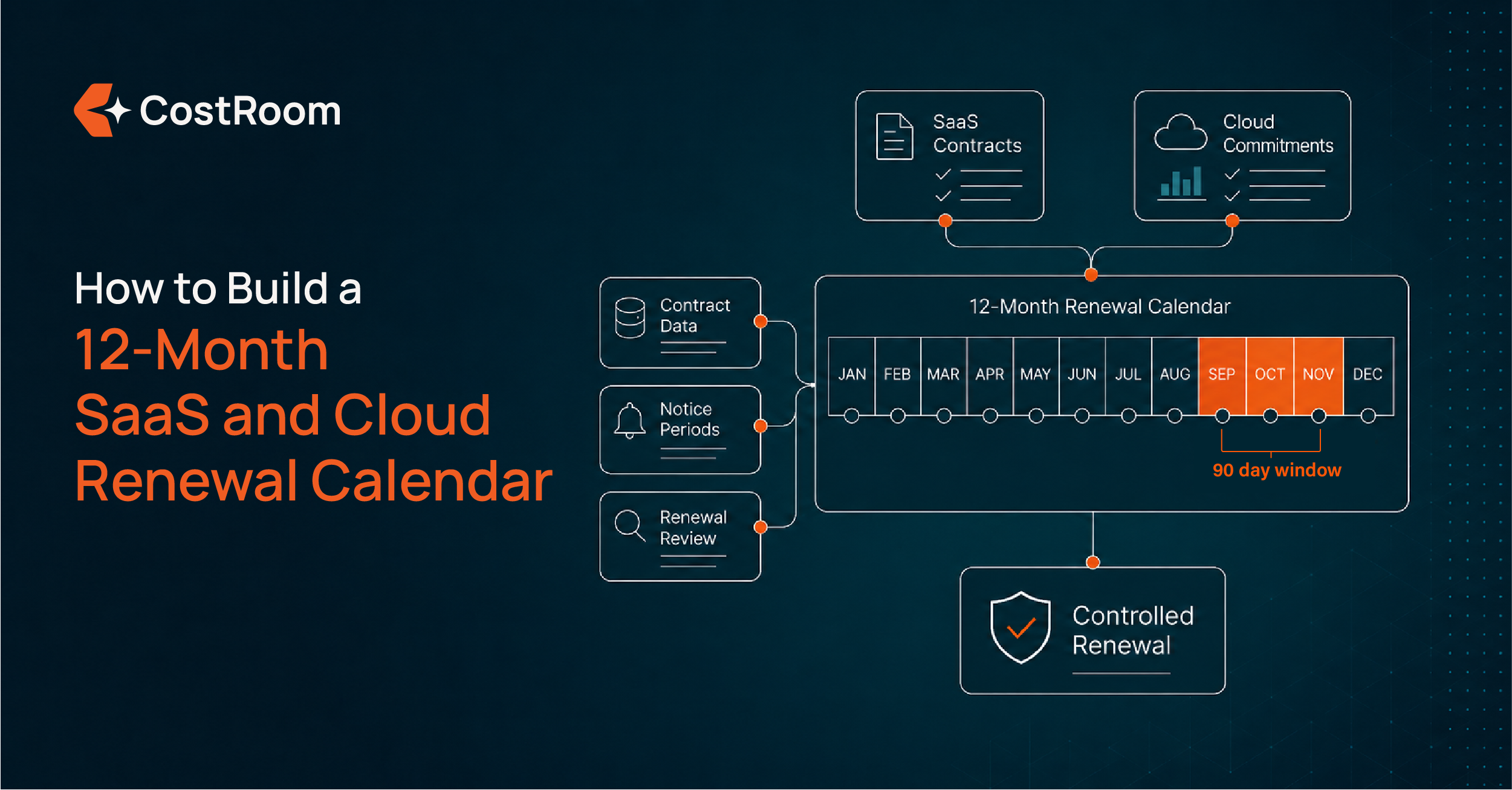
A 12-month SaaS and cloud renewal calendar is a structured, forward-looking view of every vendor contract renewal in the portfolio, showing not just the renewal date but the notice period, the engagement start date (90 days before renewal), the current pricing, and the responsible owner for each contract. It is a living document, updated at the close of each renewal and used to plan the quarter's renewal workload in advance.
It is not a list of contract expiry dates. A list tells the company when contracts end; a calendar tells the team when the work needs to start. That distinction is the difference between being in control of renewal outcomes and reacting to them.
Step 1: Audit Every Active SaaS and Cloud Contract
The first step is a complete contract inventory. This is almost always harder than expected, and almost always reveals more than expected.
For each contract, gather:
- Vendor name and product
- Contract start date and renewal date
- Notice period (the number of days before renewal by which the company must notify the vendor of intent to cancel or renegotiate)
- Whether the contract includes an auto-renewal clause
- Current pricing and contracted licence count
- Actual licence utilisation: how many licences are actively in use
- Contract owner: the internal stakeholder responsible for this renewal
Where to find this information: procurement records for formally contracted tools; finance invoices for tools purchased directly by teams; IT asset management systems for centrally managed tools; and corporate card statements and team expense reports for tools purchased outside the formal procurement process.
That last category is the one most inventories miss. For mid-size companies, a meaningful share of the SaaS stack consists of tools purchased by teams on corporate cards, during trials that converted automatically, or during the growth phase before procurement processes were formalised. These tools have renewal dates and auto-renewal clauses. They just have no record in any procurement system. The inventory is not complete without them. For more on why uncontracted spend creates the largest renewal surprises, see Why Mid-Size Companies Keep Auto-Renewing at the Wrong Price.
Step 2: Map Notice Periods, Not Just Renewal Dates
This is the step most renewal tracking approaches skip, and the one that most determines whether the calendar is operationally useful.
A renewal date tells you when the contract renews. A notice period tells you when the window to act closes. These are different dates, and the second one is what controls the negotiating timeline.
For each contract in the inventory, calculate two additional dates:
Notice period end date: the date by which the company must notify the vendor of any intent to cancel, right-size, or renegotiate. This is the renewal date minus the notice period. For a contract renewing on 1 October with a 60-day notice period, the notice period end date is 2 August.
Engagement start date: 90 days before the renewal date, or 30 days before the notice period end date, whichever comes first. This is when the renewal work begins.
If a team realises a contract is approaching at 45 days before renewal on a contract with a 60-day notice period, the window has already closed. The contract will auto-renew regardless of what happens next. Tracking both dates, not just the renewal date, is what prevents that outcome.
Step 3: Set Engagement Windows and Assign Owners
A calendar without assigned owners is a list with dates. For each upcoming renewal, assign one person and a clear engagement start date.
The engagement window works in three stages:
90 days out: Pull current licence utilisation data. Run a pricing benchmark: what are comparable companies paying for this tool or service at this volume? Assess whether the current contracted scope still matches actual usage. Decide internally whether to renew, right-size, or exit at the next opportunity.
60 days out: Initiate the vendor conversation. If rates are above market, share the benchmark data and request a revised proposal. This is where most of the negotiation happens, when both parties have time and neither is operating under a hard deadline.
30 days out: Finalise terms. Confirm in writing. Log the outcome against the contract record and update the calendar with the new renewal date and pricing.
If the engagement window is inside 30 days at the point of discovery, the window for meaningful negotiation is effectively closed. The contract will renew at existing or vendor-proposed terms. The calendar exists to make that a scheduling failure that does not repeat, not an outcome that happens every quarter.
Step 4: Layer in Cloud Commitments
SaaS contracts are half of the renewal calendar. Cloud commitments: reserved instances, committed use agreements, savings plans across AWS, GCP, and Azure, share the same structural characteristics: defined terms, renewal or expiry dates, and pricing implications that depend entirely on whether someone engaged the process proactively.
Add every cloud commitment to the same calendar using the same process: commitment end date, conversion or notice window, engagement start date, and owner. The rationale is identical to SaaS: the company that approaches a cloud commitment renewal with utilisation data and market pricing in hand consistently secures better terms than the company that lets the commitment roll over by default.
Managing SaaS and cloud in the same calendar also surfaces timing opportunities: a major SaaS renewal and a cloud commitment from the same vendor arriving in the same quarter can be approached as a coordinated position rather than two separate, unrelated conversations. For the full case on why unified management matters, see What Is a SaaS Renewal Management System and Do You Need One?. For the broader picture of where renewal management sits within a full SaaS and cloud spend optimization approach, see SaaS and Cloud Spend Optimization: The Complete Guide for Mid-Size Companies.
Where This System Breaks at Scale
The process above works reliably for a portfolio of 15 to 20 contracts with one or two dedicated owners. Above that volume, three failure modes emerge consistently.
Volume. At 30 to 50 active contracts with staggered renewal dates, the quarterly renewal workload exceeds what any small team can manage manually without gaps. The calendar becomes a source of reactive firefighting rather than proactive control.
Benchmarking. Running a meaningful pricing benchmark requires live market data for each vendor and service category. Gathering that manually, vendor by vendor, across 20-30 renewals per quarter is not a realistic workload. Without the benchmarking layer, the calendar surfaces renewals on time without producing the intelligence needed to negotiate them effectively. Timeliness without data is still a partial answer.
Uncontracted spend. The share of the SaaS stack that sits outside the formal procurement process has no documented renewal dates, no contract records, and no notice periods on file. A renewal calendar built from procurement records alone will miss these contracts entirely. Surfacing them requires a spend analysis: a complete mapping of what the company is actually paying for, including tools that have never appeared in a procurement or IT system. CostRoom's Renewal Management approach starts with exactly this analysis, covering both contracted and uncontracted spend, before any ongoing renewal management begins.
Start With the Renewal Baseline
CostRoom maps every contract, notice period, and pricing gap in your SaaS and cloud portfolio. The calendar comes with the analysis.
Frequently Asked Questions
How do I build a SaaS renewal calendar? Building a SaaS renewal calendar starts with a complete contract inventory: every active vendor contract, its renewal date, notice period, auto-renewal clause, current pricing, and contracted licence count. From that inventory, calculate two additional dates for each contract: the notice period end date (renewal date minus notice period) and the engagement start date (90 days before renewal, or 30 days before the notice period end, whichever is earlier). Assign a contract owner to each renewal and schedule the three-stage engagement window: utilisation and benchmarking at 90 days, vendor conversation at 60 days, and finalisation at 30 days.
What should a SaaS renewal tracker include? A SaaS renewal tracker should include, for each contract: vendor name and product, renewal date, notice period length, notice period end date, engagement start date, current pricing, contracted licence count, actual licence utilisation, auto-renewal clause status, contract owner, and post-renewal outcome fields for updated pricing and term. A tracker that only records renewal dates without notice period end dates and engagement start dates will surface renewals too late for effective negotiation.
How do I track SaaS and cloud contract renewals together? Add cloud commitments: reserved instances, committed use agreements, and savings plans, to the same renewal calendar as SaaS contracts, following the same process: commitment end date, conversion or notice window, engagement start date, and owner. Cloud commitments have the same structural characteristics as SaaS contracts: defined terms, expiry or renewal dates, and pricing implications that depend on whether the company engaged proactively. Managing both in the same calendar provides a complete picture and surfaces timing opportunities to negotiate SaaS and cloud commitments with the same vendor as a coordinated position.
What are the steps in a SaaS renewal management process? A structured SaaS renewal management process has four steps: complete contract inventory (every active SaaS and cloud contract with renewal date, notice period, pricing, and licence count); advance engagement scheduling (flagging each renewal at 90 days, with 60-day and 30-day stages for negotiation and finalisation); benchmarked negotiation (using live market pricing data to inform the vendor conversation); and post-renewal documentation (logging new terms and updating the calendar for the next cycle). The process runs continuously across the portfolio, with the quarterly renewal calendar determining which contracts require attention in each period.
At what point does manual renewal tracking stop working? Manual renewal tracking via spreadsheet works reliably for portfolios of 10 to 15 contracts with dedicated ownership. Above 20 to 25 contracts with overlapping quarterly renewal cycles, the combination of volume, the manual effort required to pull utilisation data and run pricing benchmarks, and the tracking of notice period end dates alongside renewal dates creates gaps. The contracts that fall through manual tracking tend to be the ones with the longest notice periods and the largest escalation clauses, because those required the earliest engagement and got none.